
Kpop Piano Beats - Music Game review
 Analysis by GetAllApps
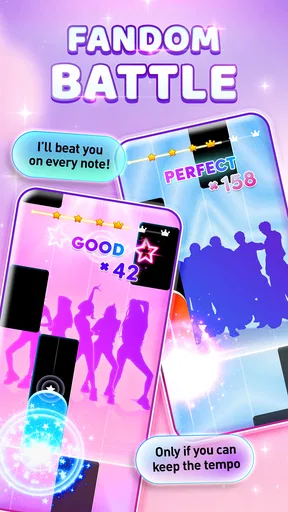
I see Kpop Piano Beats - Music Game as a casual rhythm game with a clear appeal: it turns listening to K-pop into a quick, hands-on challenge. Its piano-tile format is easy to understand, so I can start playing without learning a complicated control scheme. The appeal is less about becoming a pianist than keeping up with the beat, building a score, and enjoying familiar musical energy in short bursts.
That simplicity is also the game’s main trade-off. If you want a structured music course, detailed instrument controls, or a deep rhythm-game system, this is not the choice I would make. If you want an accessible K-pop-themed game for spare moments, though, it offers a straightforward way to turn a few minutes into a focused play session.
What the rhythm-tile format does well
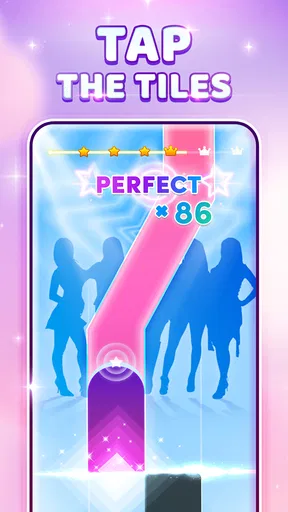
The core interaction is immediately readable: follow the music and tap the tiles in time. That makes the game approachable even if you have never played a piano game before. I like this kind of design when I want to get into a song quickly rather than spend the first session studying menus or mastering a complicated set of inputs.
There is still a small skill curve. At first, I can concentrate on reacting to the tiles; once the pattern feels more familiar, the challenge becomes maintaining a steady rhythm instead of tapping in a panic. That shift gives repeat play a purpose. I am not learning piano technique, but I am getting better at coordinating my attention and timing.
The format works especially well in brief sessions. A practical use case is a commute or a wait between appointments: I can open the game, focus on one run, and put it away without needing a long uninterrupted block of time. It is also a better fit for a quick mental reset than a game that demands a lengthy story or a complicated setup.
One useful way to approach a new track is to resist chasing a score on the first attempt. I would focus on following the tile rhythm and keeping my taps controlled, then try to improve the result on a later run. That makes the game feel less frustrating, particularly when a lively song encourages you to tap faster than the pattern actually calls for.
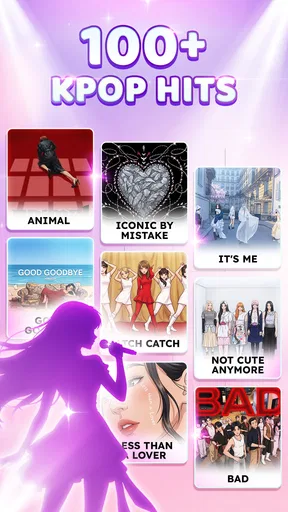
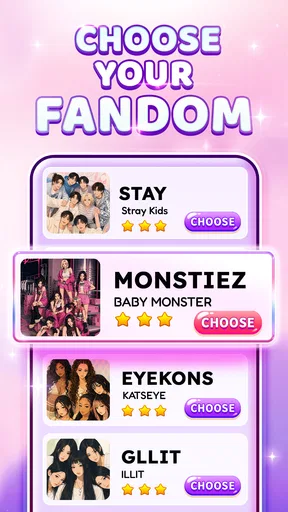
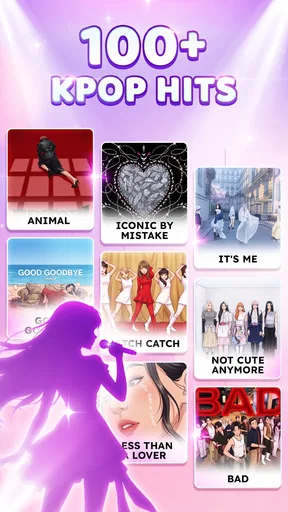
Its identity matters, too. This is a music game built around K-pop, not a general piano-learning tool that happens to include pop songs. The theme gives fans a reason to choose it over a plain rhythm app, while the simple input keeps it accessible to people who enjoy the genre but do not want a demanding game.
Where it sits among music games
Compared with music games that ask players to use several buttons or learn elaborate note patterns, this piano-tile approach is easier to pick up on a phone. That convenience comes at a cost: the interaction is narrower. Players who enjoy more complex chart-reading, instrument simulation, or long-term skill progression may find a specialist rhythm game more satisfying.
It is also different from a piano-learning app. The focus here is entertainment and timing, not guided lessons, music theory, or practice on a real keyboard. I would not recommend it as a substitute for learning to play. I would recommend it as a light game for someone who likes K-pop and wants a simple way to engage with music rather than passively stream it.
The distinction is helpful when deciding what to install. If the goal is to relax with familiar musical style and a modest challenge, the tile format is a strength. If the goal is to train musical skills in a structured way, the game’s playful scoring focus is likely to feel limited, and a dedicated learning app would be a better match.
What to expect from the experience
Because the controls are simple, the quality of a session depends heavily on whether the available music and the pace suit you. A fast or busy sequence can demand more concentration than the basic premise suggests. I would treat it as an active game, not background entertainment: looking away or dividing attention makes it harder to stay with the rhythm.
That also suggests a small practical tip. For a first session, choose a moment when you can give the screen your attention rather than trying to play while handling another task. Once the tapping feels familiar, short casual sessions become easier to fit into the day. The game’s straightforward premise does not mean every run will be effortless.
Another useful trade-off is that repetition can be either the draw or the drawback. Trying to improve a score gives a track replay value, especially for players who enjoy chasing a cleaner run. But if you need constant changes in objectives or a broader range of mechanics to stay interested, repeating a tap-and-follow pattern may become monotonous. I would decide based on whether improving timing is satisfying to you.
Who is likely to enjoy it
I would point K-pop fans toward it first, particularly those who like small, score-focused games and want a music-themed activity that is easy to start. It can also work for younger players who enjoy rhythm challenges; the content rating is Everyone 10+. The game is free to download, which makes it easy to try, while optional in-app purchases range from $0.99 to $2.99 per item.
The purchase range is worth keeping in mind if you prefer games with no optional spending at all. I would treat the free entry point as a chance to see whether the songs and tapping style suit you, and decide about purchases only after playing. The existence of in-app purchases does not change the central question: whether the rhythm-tile gameplay itself holds your interest.
For people who are new to K-pop, the game may still be approachable as a casual rhythm title, but its strongest identity is tied to the genre. Someone who mainly wants a broad library spanning many musical styles may prefer a more general music game. Likewise, players who want realistic piano controls should look elsewhere; tapping tiles is not the same experience as playing notes on a keyboard.
It is less suitable for anyone who dislikes score-chasing or quick visual reactions. If a missed tap makes you tense rather than motivated to retry, a slower music experience may be more enjoyable. And if you want multiplayer competition, a narrative campaign, or substantial customization, those are not reasons I would choose this game; its central attraction is the focused rhythm challenge.
Practical details before installing
Sonata Studio: Piano Rhythm developed the game, which has a 4.7 average from around 494,000 ratings and more than 10 million installs. Those figures suggest that the simple K-pop rhythm concept has reached a large audience, though popularity alone cannot tell you whether its particular music and pace will fit your taste.
It was released on August 30, 2023, and version 5.10.0 requires Android 7.0 or later. I would check that your device meets that requirement before trying to install it. The game is listed as free, with individual in-app purchases priced from $0.99 to $2.99, so it is possible to explore the basic experience before deciding whether optional spending makes sense for you.
One question people often have is whether this is a good way to practice piano. In my view, it is better understood as a rhythm game with piano-themed tapping, not a teaching tool. Another is whether it suits quick breaks: yes, its simple premise lends itself to short sessions, provided you can focus on the screen. If you are looking for a substantial, long-form game, you may find that brief-session strength less compelling.
My verdict for K-pop fans
Kpop Piano Beats - Music Game succeeds when judged on its own terms: it makes K-pop rhythm play easy to start and gives score-minded players a reason to repeat a run. I appreciate that the basic interaction does not demand music-game experience, and that a short session can still feel focused. The strongest case for it is simple: you enjoy K-pop, like tapping games, and want a compact challenge rather than a piano course.
The weaknesses are just as clear. The narrow tile-based interaction may feel repetitive, and players seeking broader musical variety, deeper mechanics, or real keyboard practice should choose something else. It is also not an ideal pick when you want music to sit quietly in the background, since keeping time requires attention.
Overall, I would recommend it to a friend who wants an uncomplicated K-pop rhythm game to play in spare moments. I would set expectations around quick, repeatable sessions rather than a deep musical experience. If that sounds like the kind of fun you want, the free download makes it a reasonable game to try; if you want lessons or a more elaborate rhythm system, a different app will serve you better.
Pros and cons
Pros
- Simple tap controls make songs easy to start playing.
- Short rounds suit quick play sessions.
- Beat-based challenges can help improve timing.
- Unlockable songs give players goals to pursue.
- The music game format can appeal to K-pop fans.
Cons
- Song selection may feel limited to some players.
- Faster tracks can be difficult for beginners.
- Missed taps can quickly disrupt a run.
- Progress may require repeated play.
- Ads may interrupt the experience.


